Bulk Edit Sheet for Trello
Edit many cards at once, and see every change before it is made
Your board as a sheet: type into cells, fill a block, or paste from Excel, custom fields included. Review the changes, apply them, and undo if you need to.
Bulk Edit Sheet is with Trello for review and will be in the Power-Up directory once it is approved.
- Free for 25 cards at a time
- Works with custom fields
- Your cards never pass through our server
Why it exists
Changing forty cards should not take forty clicks
Bulk tools that write straight to the board are quick until one goes wrong. This one keeps your edits to one side until you have checked them, and can put everything back.
Your board as a sheet
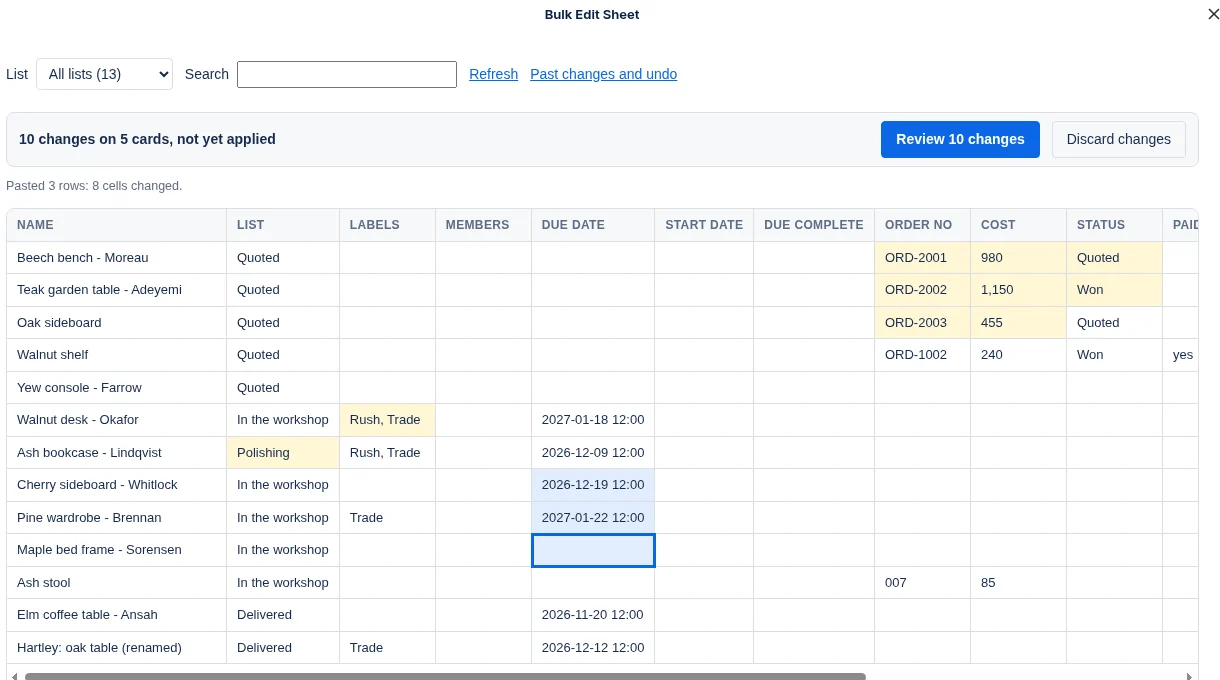
Every card is a row; name, list, labels, members, dates and each custom field are columns. Filter by list or search to find the cards you want.
Paste from Excel, into custom fields too
Copy a block of cells in Excel or Google Sheets and paste it. It fills right and down from the cell you selected. Empty cells in the block change nothing.
Fill a whole block at once
Select a block with Shift, then type or paste one value to fill it. Set a status, a due date or an owner on forty cards in one go.
Nothing changes until you have looked
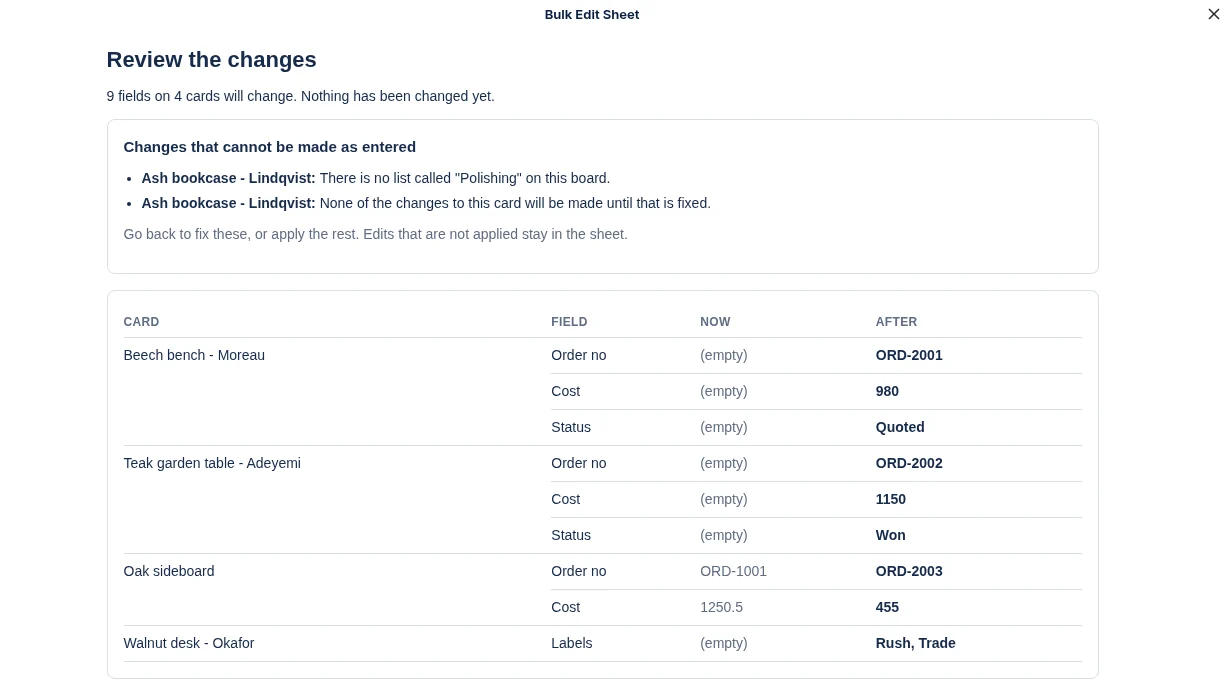
Edits are held in the sheet and highlighted. Review lists every field that will change, with what it holds now and what it will hold after.
Undo the lot
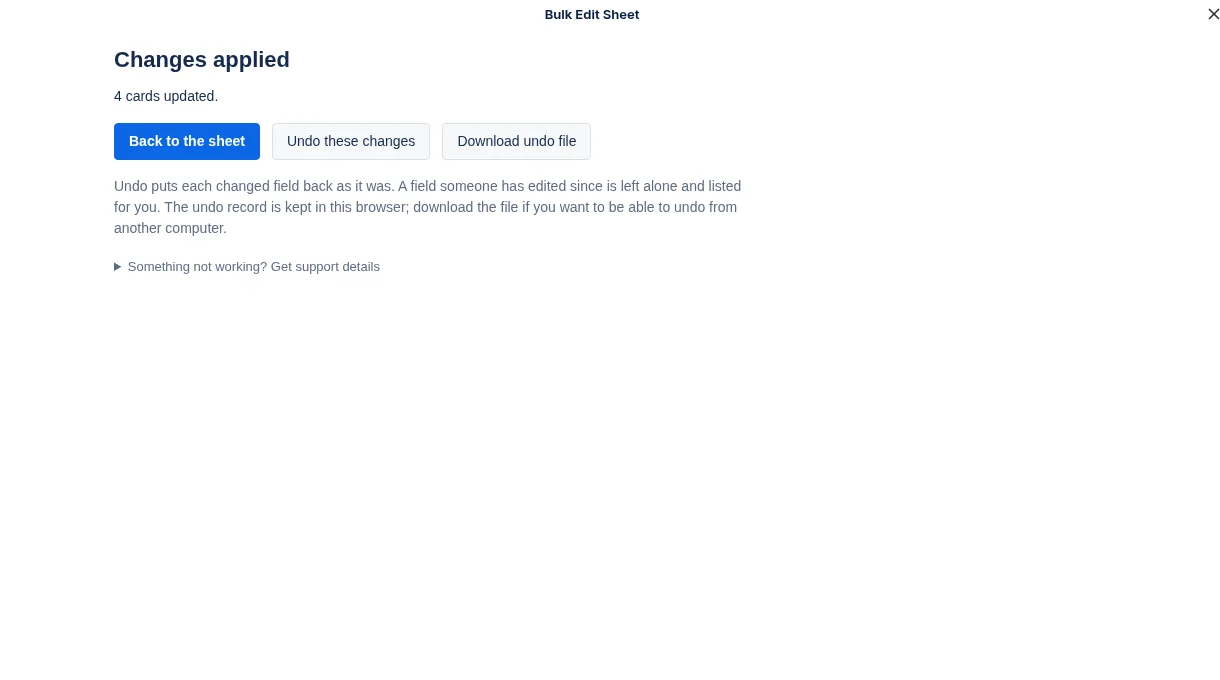
One button puts every changed field back as it was. A field someone has edited since is left alone and listed for you.
Mistakes are caught, not written
A list that does not exist, a date that cannot be read, a name shared by two labels: each is explained against the card, and that card is left untouched.
How it works
Edit, review, apply
Edit or paste
Open Bulk edit from the top of your board. Click a cell and type, select a block and fill it, or paste a block copied from a spreadsheet. Changed cells are highlighted and nothing is written yet.
Review
Every field that will change is listed with its old and new value. Anything that cannot be done as entered is explained against its card.
Apply, and undo if you need to
Changes are written at a pace Trello accepts. Afterwards one button puts everything back as it was.
Pricing
Free to use properly. One flat price after that.
Free
$0
For small tidy-ups.
- Changes to up to 25 cards at a time
- As many times as you like
- Every feature, including paste and undo
Bulk Edit Sheet
$4.99 a month
One price for the whole Trello workspace.
- Changes to any number of cards at once
- Every board in the workspace
- Every member, with no seats to count
- Cancel at any time
All our Power-Ups
$9.99 a month
Everything we make, for the whole workspace.
- Every Power-Up listed here, without limits
- Each new Power-Up as it is released
- Every board and every member
- Cancel at any time
Payment is taken by Stripe. You subscribe from inside the Power-Up, and a workspace admin can change the card, switch plan or cancel from the same place. If you cancel, it runs to the end of the month you have paid for. Prices are in US dollars.
Card Approvals is with Trello for review and will be in the Power-Up directory once it is approved. The plan covering all our Power-Ups opens the same day.
Questions
Good to know
Does anything change while I am typing?
No. Edits are kept in the sheet and highlighted. Nothing is written to the board until you choose Review, look at the list of changes and choose Apply.
Does a pasted block overwrite everything under it?
Only where the block has a value. Empty cells in what you paste leave the card as it is. To empty a field on purpose, select the cell and press Delete.
Can I undo?
Yes. After applying, one button puts every changed field back as it was. A field someone has edited since is left alone and listed for you. The last five sets of changes per board can be undone from "Past changes and undo", and you can download an undo file.
What can I paste?
A block of cells copied from Excel, Google Sheets or Numbers. It fills the cells you can see, right and down from the selected cell. Empty cells in the block change nothing; to empty a field, select the cell and press Delete. It never adds cards or columns.
How do I write dates, labels and members?
Dates as 2027-03-04 or 04/03/2027, with a time if you want one. Labels by name, separated by commas. Members by @username. Dropdown fields by the name of the choice. Checkboxes as yes or no.
What if I get something wrong?
The review lists it against the card in plain words (for example a list that does not exist) and leaves that card untouched. Your edit stays in the sheet so you can fix it.
Does it work on a free Trello plan?
Yes, for names, lists, labels, members, dates and descriptions. Custom-field columns appear when the board has custom fields, which need a paid Trello plan.
What permission does it ask for?
Trello asks you to allow the sheet to read and change cards. Trello grants this for all the boards you can edit, because that is the only way it offers; the sheet only works on the board you opened it from.
Where does my data go?
Between your browser and Trello. Card data does not pass through our server. The only thing our server stores is which workspace has a subscription.
Something else? Write to support@stumason.dev.